←  Back to all work

MDX Hub: no more waiting around for your turn

A self initiated mobile app for Middlesex University Dubai that makes booking campus activities and joining clubs fair, simple and stress free.

MY ROLE
Strategy, user research, personas, sketching, wireframing, prototyping and usability testing
PROJECT TYPE
Final year university project, self initiated
USERS
Students and faculty at MDX Dubai
TOOLS
Figma, pen and paper, Excel
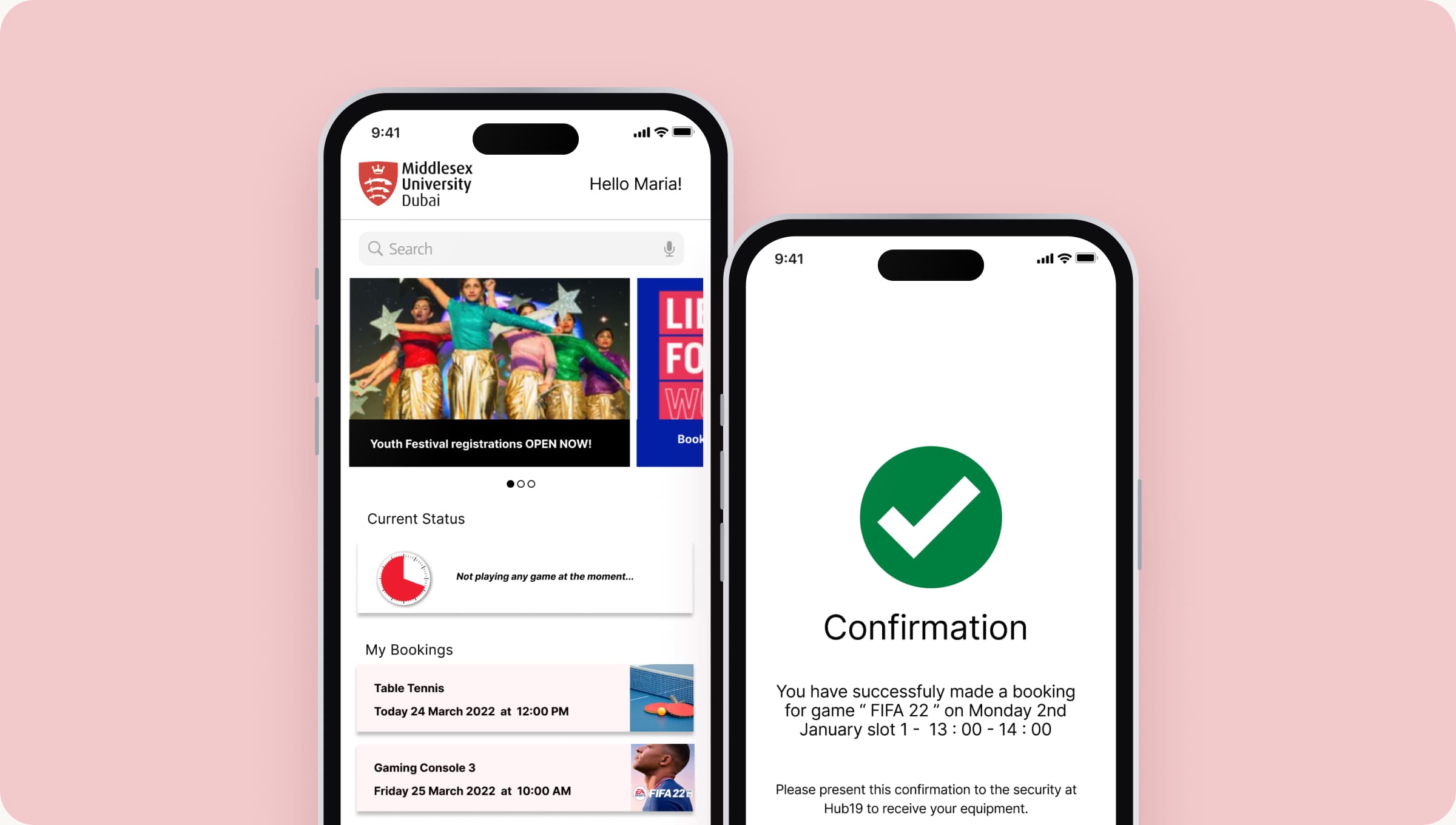
Two MDX Hub app screens: the student home with events and bookings, and a booking confirmation for a Hub19 game

THE STORY

It started with a problem I ran into almost every week.

The problem

Hub19, our campus gaming hub, was the place everyone wanted to hang out. But there was no way to book it. You had to wait around in person, and if you stepped away for a minute, you could lose your spot. It felt unfair and pretty chaotic.
My idea

A mobile app where students can book a time slot at Hub19, join and keep up with clubs, and get notified about their bookings. Staff get a simple way to add games and clubs and manage schedules. Simple, fair and no more hovering by the door.

THE BIGGER CHALLENGE

It wasn't just Hub19. My friends and I also found it hard to keep track of clubs and actually join them. That told me there was a chance to improve how the whole student activities department worked, not just one room.

OBJECTIVES

What I set out to do

01

Understand the deeper issues in the student activities department

02

Find out what students struggle with in the current booking process

03

Research and define clear personas

04

Design low and high fidelity prototypes

05

Test the solution with real users to make sure it meets their needs

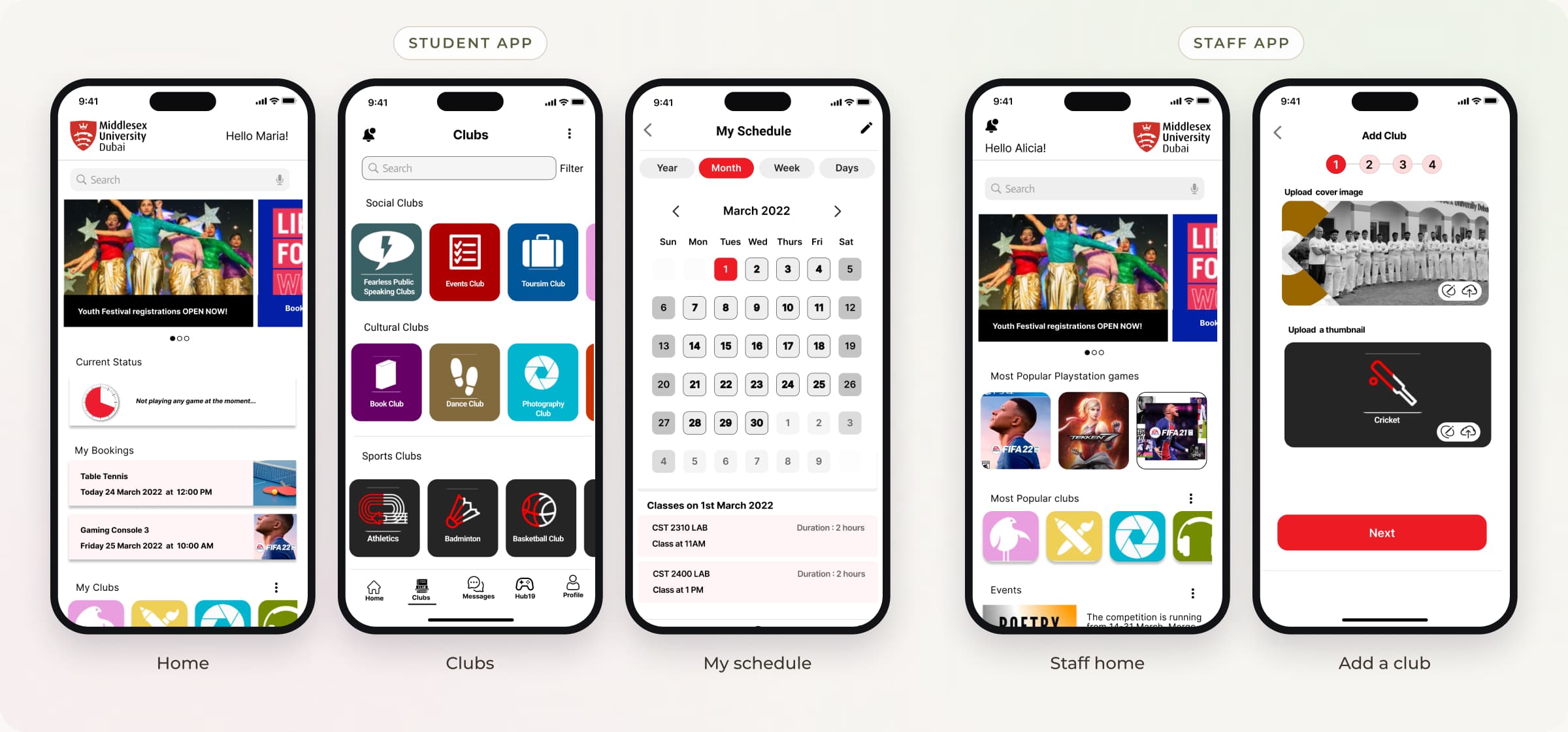
Five screens from the student and staff apps: the student home, clubs, my schedule, the staff home and adding a club

THE PROCESS

How the project came together

  1. Step 1

    Research

    Secondary researchSurvey and interviews

  2. Step 2

    Define

    Personas and journey mapsUse case diagram

  3. Step 3

    Design

    Sketches and wireframesHigh fidelity prototype

  4. Step 4

    Test

    Usability testingFindings and redesign

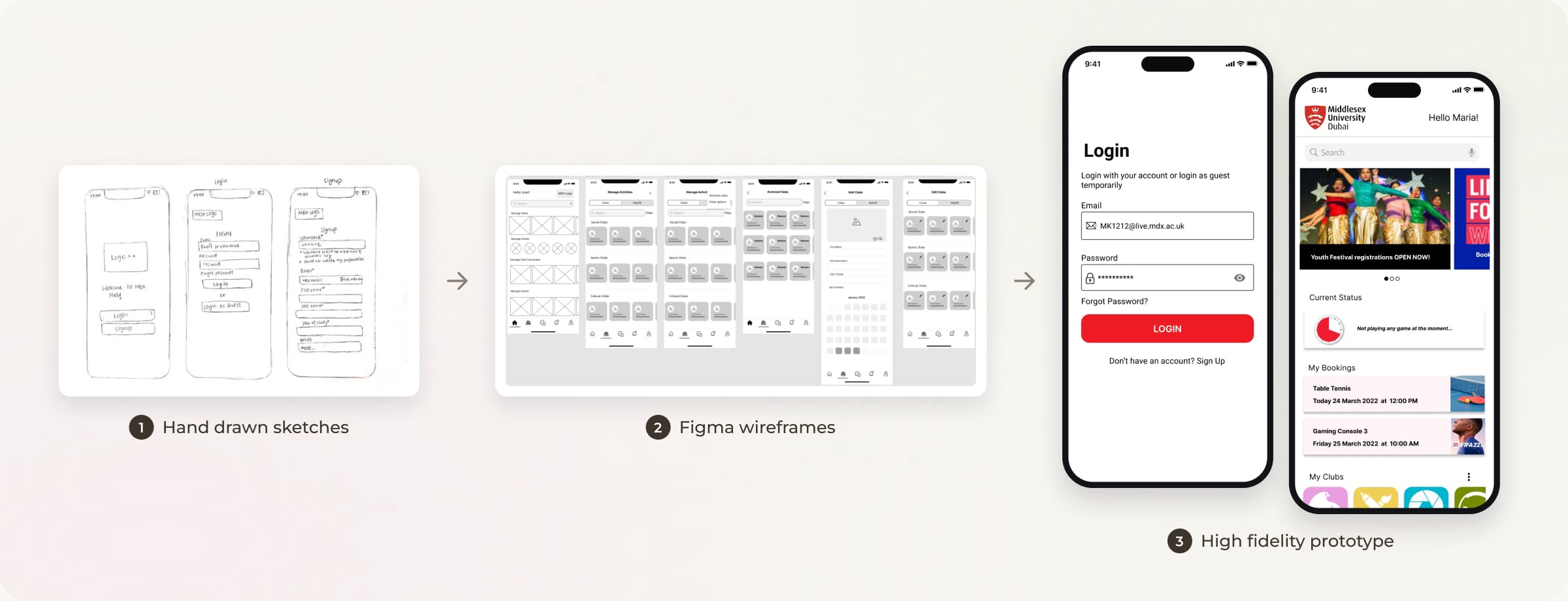
From hand drawn sketches, to Figma wireframes, to the high fidelity login and home screens

SURVEY & INTERVIEWS

Asking students and staff what wasn't working

Before talking to anyone, I read up on student motivation and how gamification can encourage people to take part. I then sent students a quick five minute survey to understand their needs, motivations and frustrations. To go deeper, I interviewed students and faculty in the department about the issues they faced and what they thought of the systems already in place.

  • 5 minute student survey
  • Student interviews
  • Faculty interviews

5 MINUTE SURVEY

“I'd rather book online”

Hub19 game times aren't clear

QR codes and the website don't always work

Club meetings are too late at night

STUDENT INTERVIEWS

“Why do I log in every time?”

The booking site is hard on a phone

Anyone could show my confirmation screenshot

No reminder when my slot is ending

FACULTY INTERVIEWS

“The paper register can be faked”

Game times are tracked by hand

Club sign ups are scattered

Daytime activities would keep members

What students and staff told me in the survey and interviews

KEY INSIGHTS

What students told me

Online, please

Students much preferred an online system for booking games and joining club activities.

Scheduling was confusing

Nobody was quite sure when Hub19 games were on, which was the biggest frustration.

Joining clubs was hit and miss

Websites and QR codes existed, but they didn't always help people actually sign up.

Timing matters

Many found evening club sessions hard to make and asked for more daytime activities.

PERSONAS

Two types of students, two sets of needs

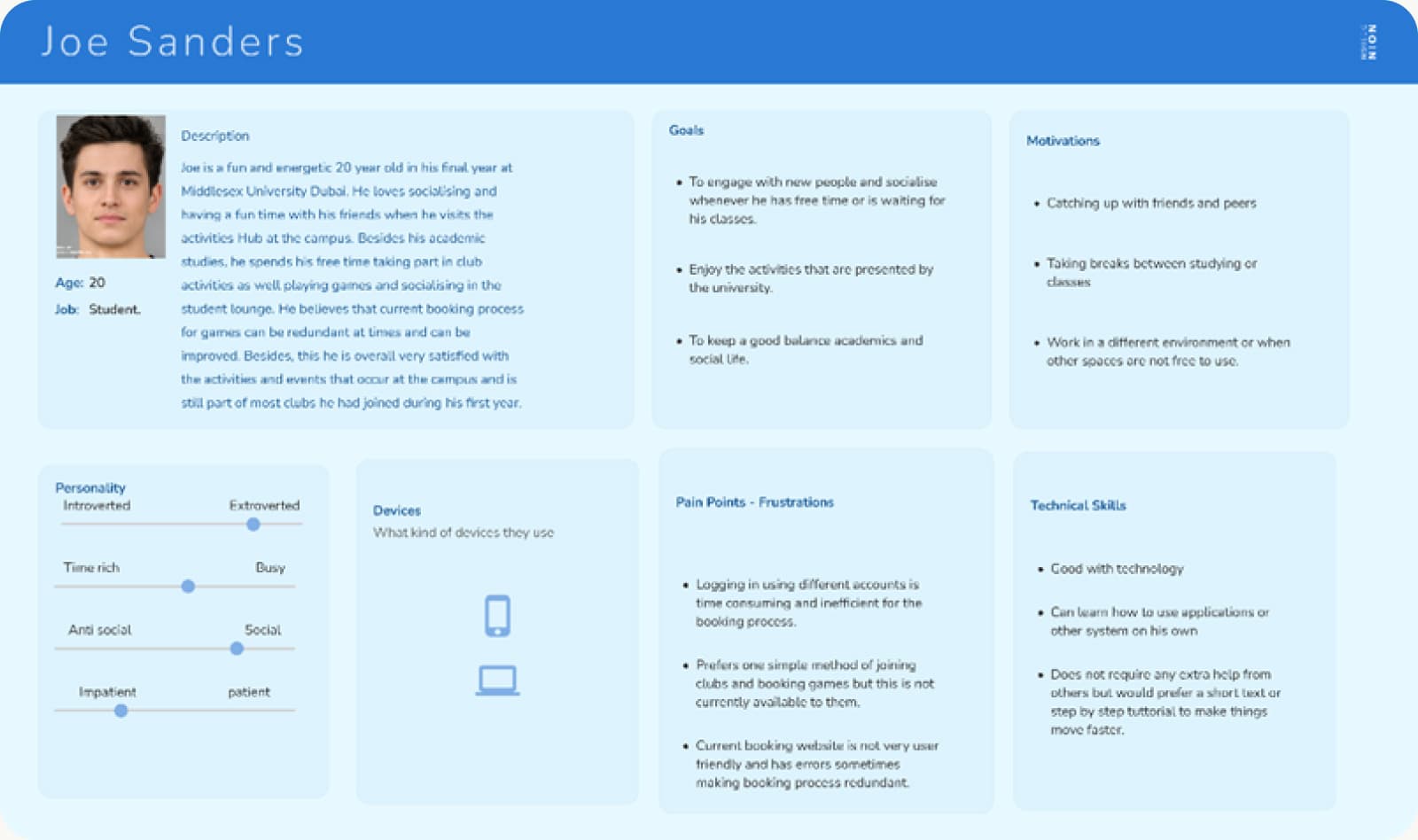
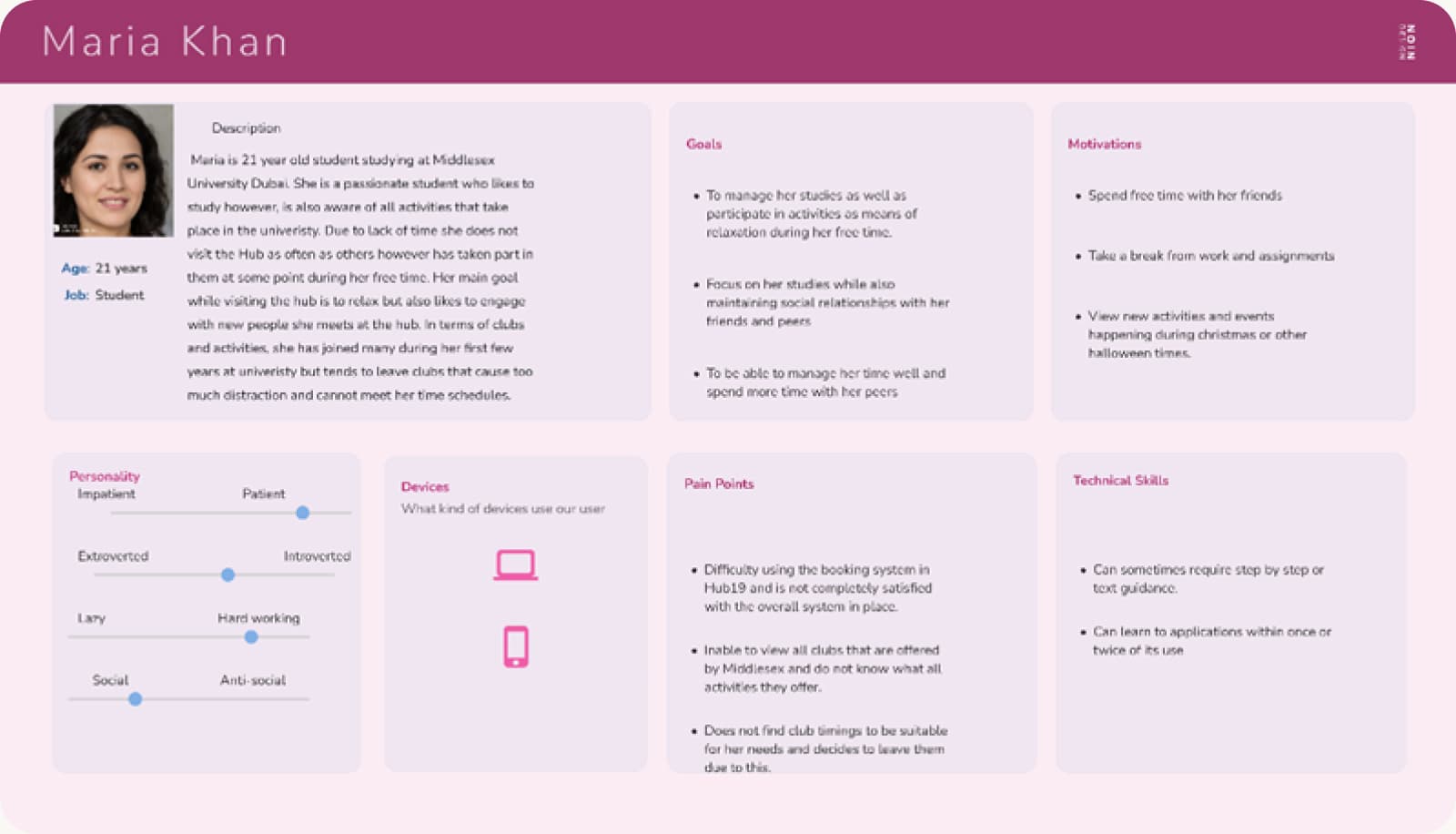
I grouped participants with similar answers in a spreadsheet, and two clear personas came out of it: Joe Sanders, "The Enthusiast", a social final year student who lives at Hub19 between classes, and Maria Khan, "The Intellectual", who wants to join activities but keeps leaving clubs because the timings clash with her studies.

Persona card for Joe Sanders, The Enthusiast, with his goals, frustrations and motivations
The Enthusiast: Joe Sanders
Persona card for Maria Khan, The Intellectual, with her goals, frustrations and motivations
The Intellectual: Maria Khan

USER JOURNEY MAPS

Seeing the experience through their eyes

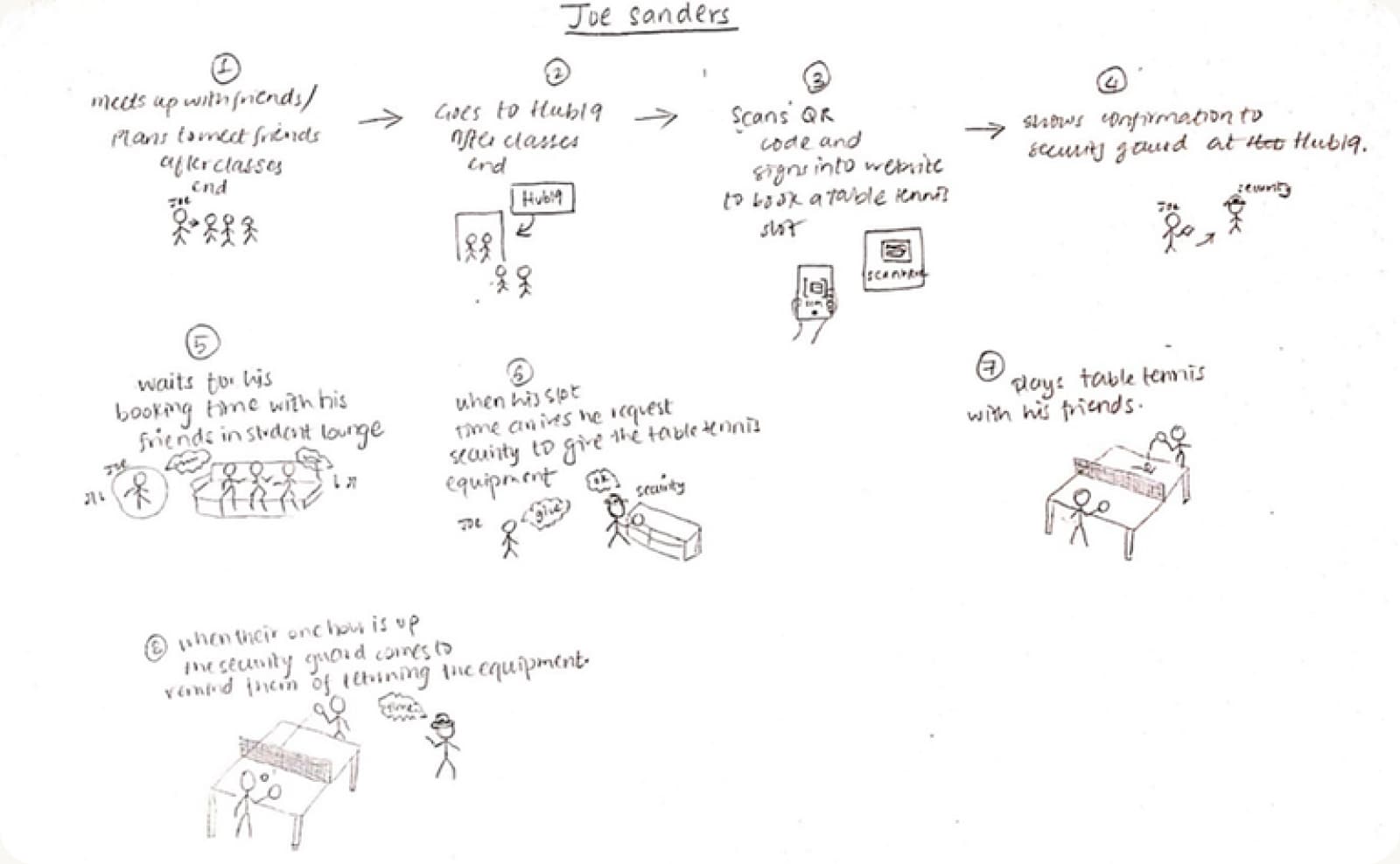
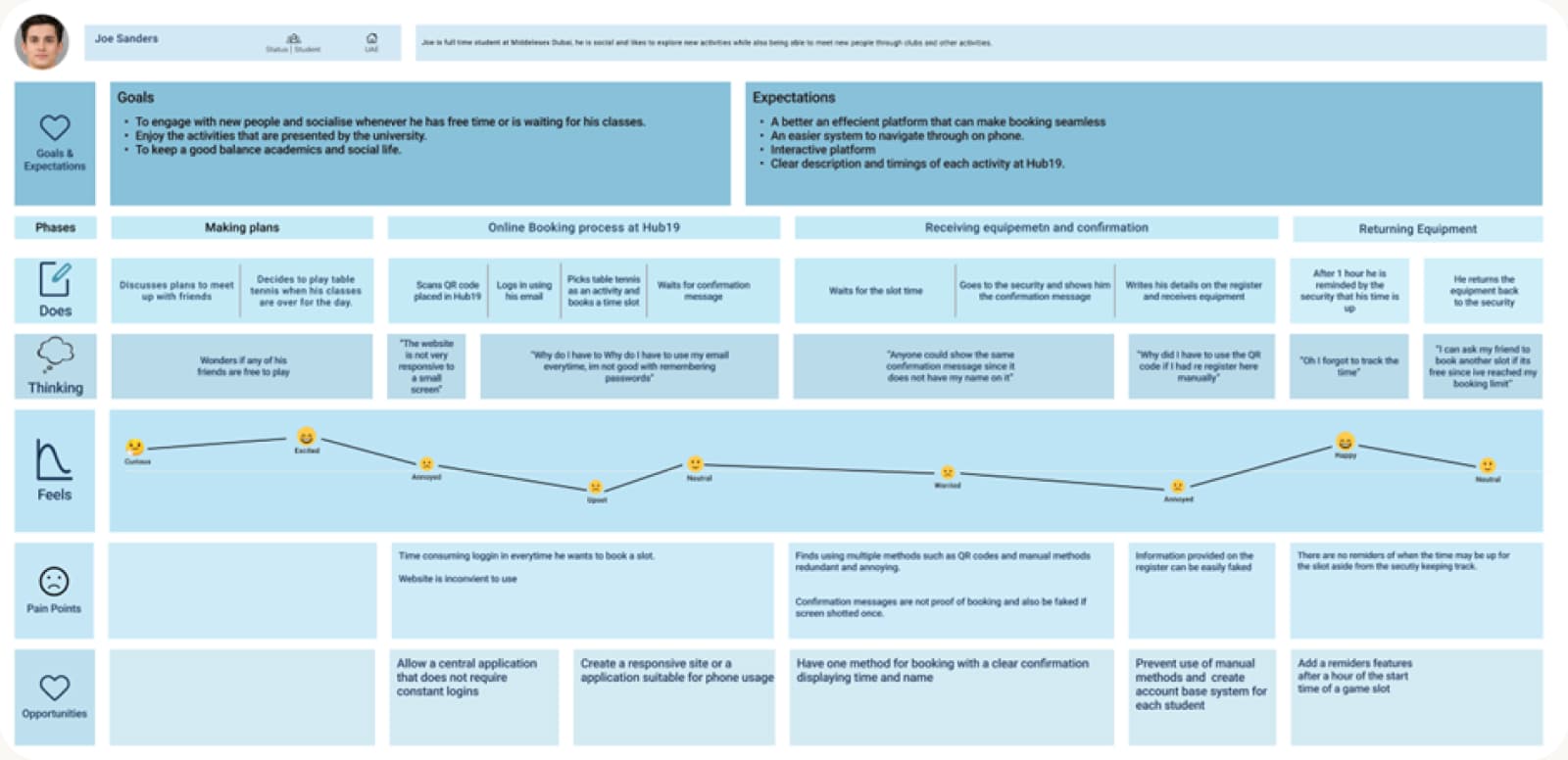
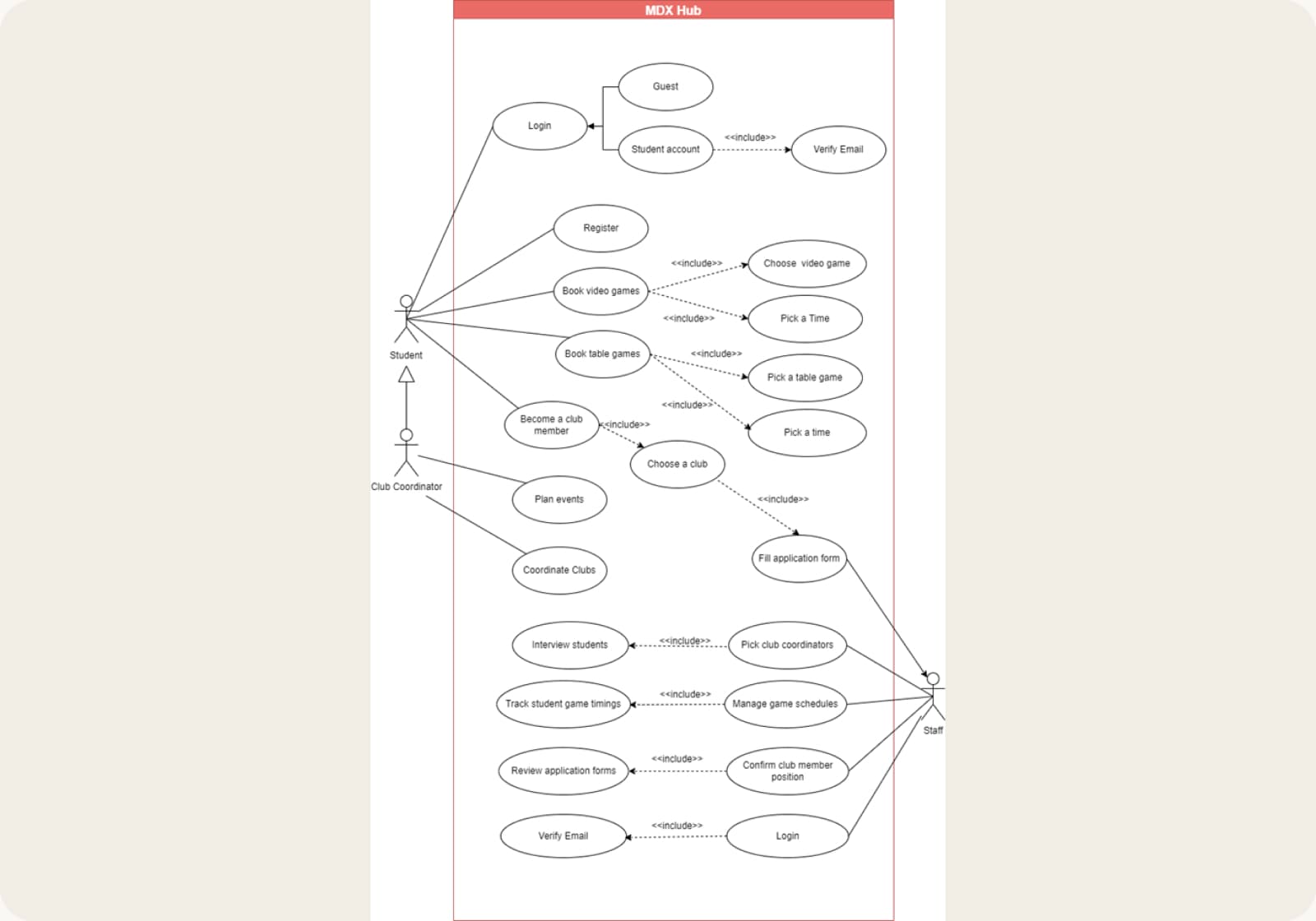
Next, I storyboarded a typical Hub19 visit and turned it into a journey map, from making plans with friends to booking a table and returning the equipment. It showed exactly where things broke: logging in every time, a booking site that didn't work well on phones, confirmations that could be faked and no reminder when a slot was ending. To pin down who does what, I also drew a use case diagram covering students, club coordinators and staff.

Storyboard of a typical Hub19 visit, from making plans with friends to returning the equipment
Journey map of a Hub19 visit showing actions, thoughts and pain points at each stage
Use case diagram showing what students, club coordinators and staff can each do in the app
Use case diagram for students, club coordinators and staff

SKETCHES & WIREFRAMES

Starting with pen and paper

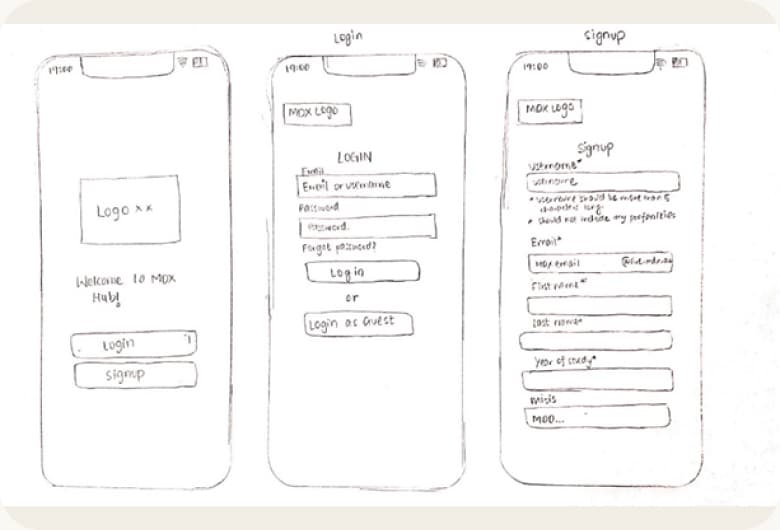
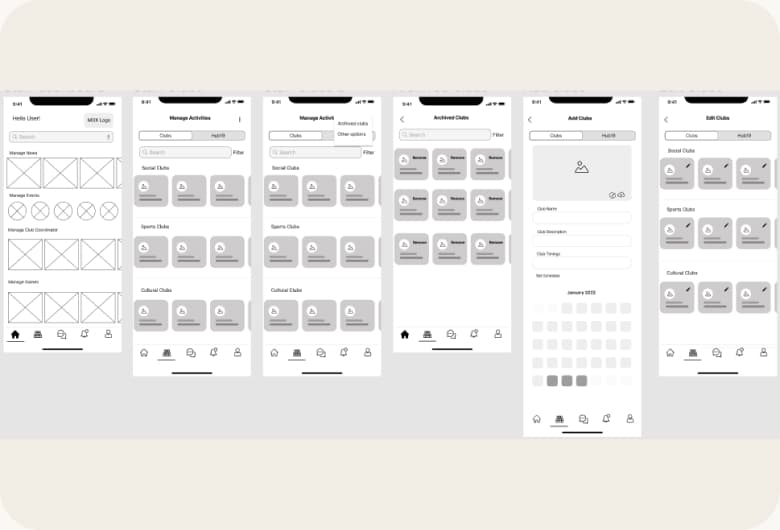
I hand drew all my first sketches, working through how each screen could meet the personas' needs. Then I moved into Figma to create wireframes, which helped me choose the right design patterns, shape the menu bar and decide where everything should sit on screen.

Hand drawn sketches of the welcome, login and sign up screens
Hand drawn sketches
Grey box Figma wireframes of the app's main screens
Figma wireframes

HIGH FIDELITY PROTOTYPE

Bringing it to life in Figma

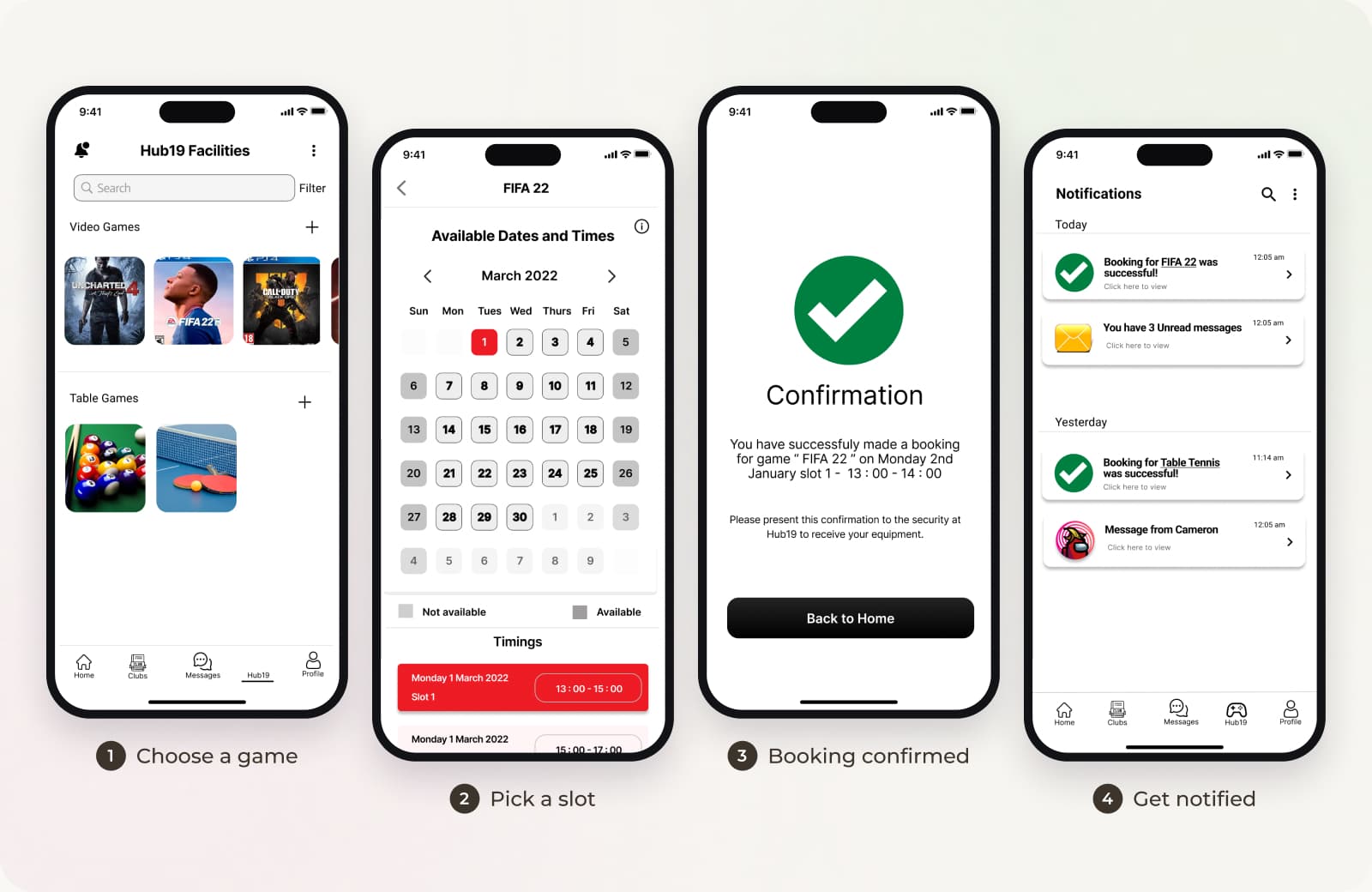
I designed the high fidelity screens in Figma and linked them into a clickable prototype. Early feedback showed students needed an easier way to browse games and clubs, wanted their booking status and time to be obvious, and wanted to book, cancel or change bookings remotely. So I added recommendations and a status bar to the home page, and a manage booking option.

Four screens for booking Hub19: choose a game, pick a slot, booking confirmed and get notified
Booking a Hub19 slot, from choosing a game to getting notified

USER TESTING

Going back to the people I first spoke to

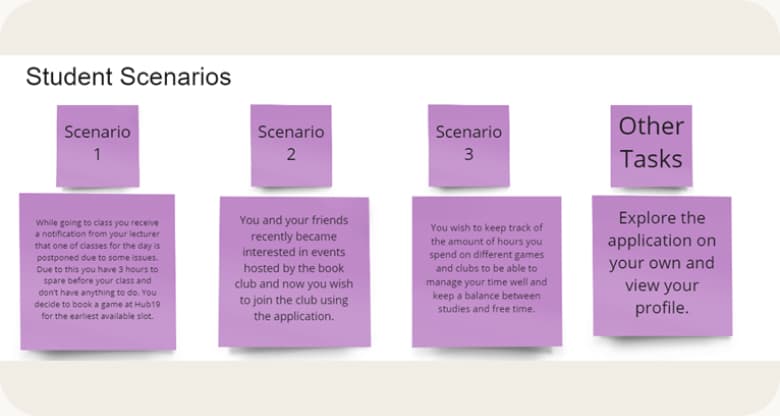
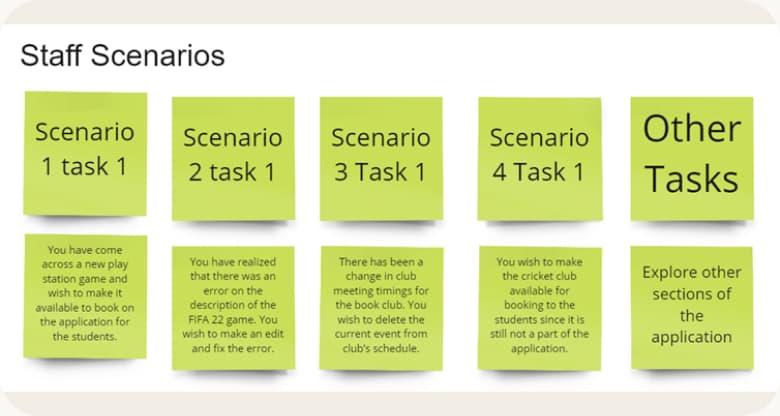
Once the prototype was ready, I tested it with the same students I had interviewed at the start, plus two faculty members. Each person worked through realistic scenarios: students booked the earliest Hub19 slot before a cancelled class, joined the book club and tracked their hours, while staff added a new PlayStation game, fixed a game description, updated a club schedule and opened bookings for the cricket club.

Student test scenarios on sticky notes: booking the earliest Hub19 slot, joining the book club and tracking hours
Staff test scenarios on sticky notes: adding a game, fixing a description, updating a club schedule and opening cricket club bookings

FINDINGS & REDESIGN

Turning feedback into improvements

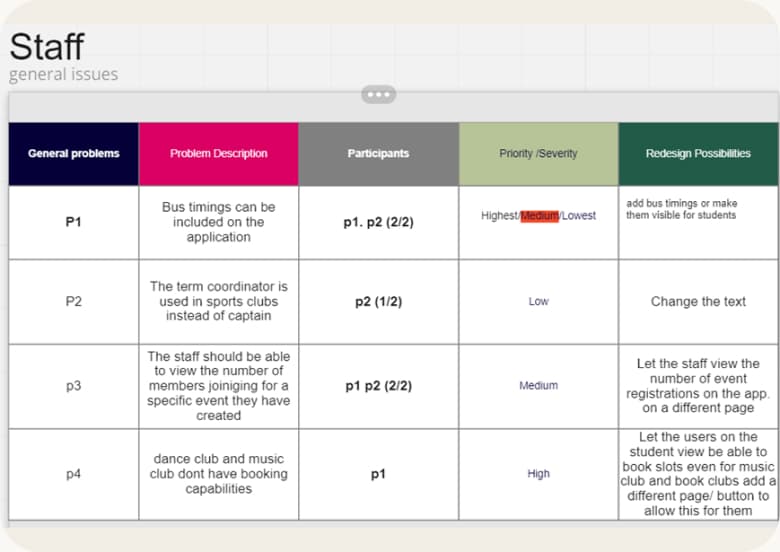
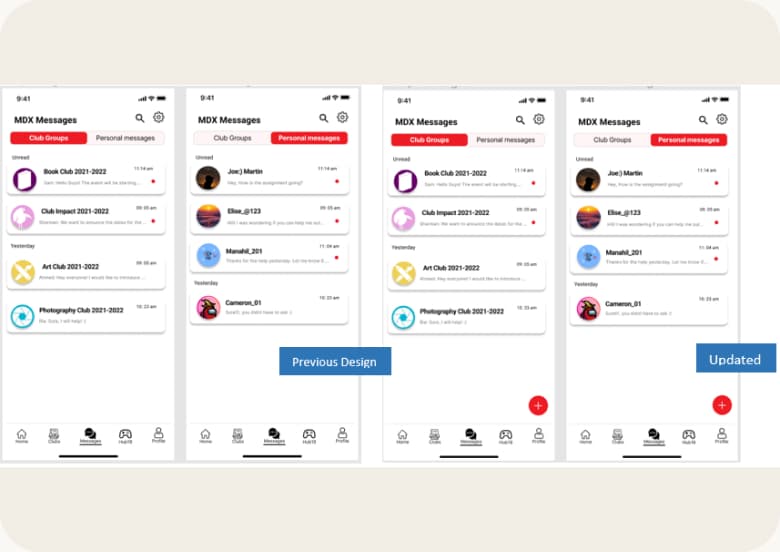
I logged every issue in a table with its priority, then redesigned the areas where people struggled. Staff asked to see how many people registered for each event, wanted music and dance clubs to be bookable too, and suggested adding bus timings, while small wording fixes like "captain" instead of "coordinator" made the sports clubs clearer. I also refined screens like messages based on feedback.

A table of usability issues found in testing, each with a priority
Issues logged by priority
Screens redesigned after testing
Redesigned screens

OUTCOMES

What the testing showed

MDX Hub proved to be a useful app for both faculty and students, based on the results of the usability tests. Overall the process went well, and the feedback on the project was very positive.

FINAL THOUGHTS

Looking back on the project

Where it could go next

  • Run more interviews and usability tests to keep refining the experience.
  • Explore ideas like gamification to motivate more students to get involved in clubs and activities.

You might also like

DIFC App

One app for work, life and everything in between across Dubai's financial district.

Read the story

Itinerary Builder

A smart planner that makes building and sharing a multi day trip feel easy.

Read the story